

Remember Fuchsia, Google’s experimental second operating system? It has mostly receded from headline news, but a thoughtful community project has revived the early “Armadillo” user interface that originally introduced many people to the project.
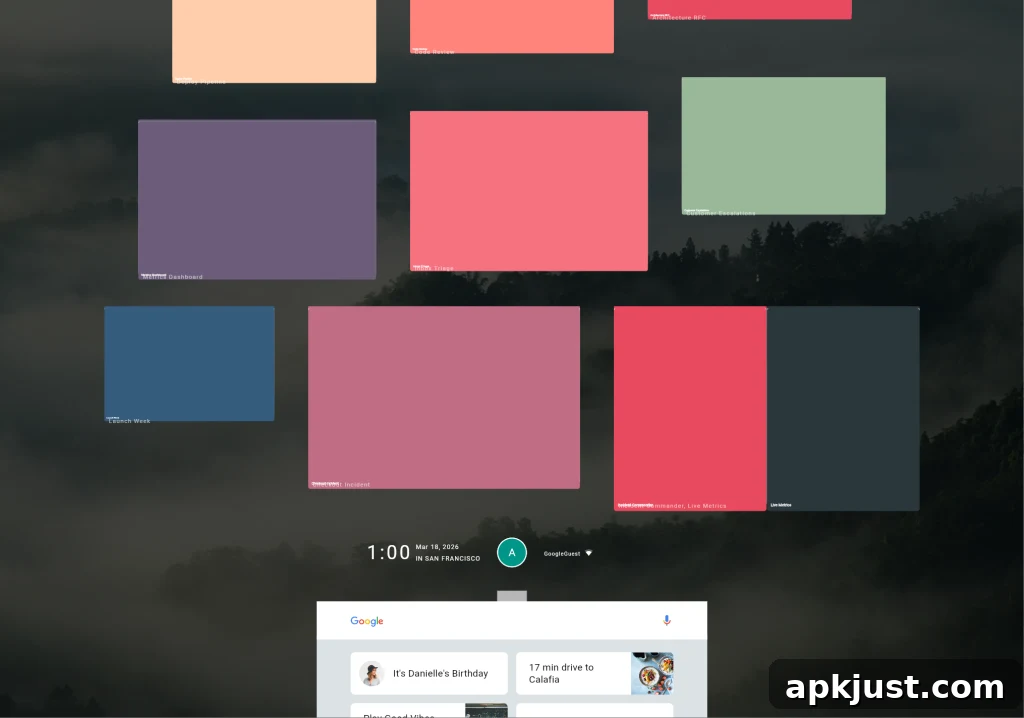
First publicly discussed about a decade ago, Fuchsia attracted attention for exploring a different direction than Android and Chrome OS. One of its earliest and most striking UI concepts, nicknamed “Armadillo,” presented a very different way to interact with apps: a compact quick settings and control hub along the bottom of the screen, with recent apps stacked above it in reverse chronological order. That arrangement offered a distinct approach to multitasking and quick access that stood apart from more conventional mobile and desktop layouts.
Journalists and developers closely followed Fuchsia’s evolution. Early coverage and hands-on previews documented how the Armadillo concept looked and behaved, highlighting the creative design choices that made the UI memorable. Over time, Google shifted the project’s course. While Fuchsia did go on to power certain Nest Hub smart displays, the particular Armadillo home and multitasking experience did not become part of the mainstream Fuchsia builds used in production devices.
Today, a former Google designer who previously worked on Material You has brought that early Armadillo concept back into the spotlight. Using publicly available open source code and AI-assisted tooling, the developer rebuilt a working web-based recreation of the Armadillo interface. Hosted as a simple web app, this revival lets curious users explore the look and feel of the original UI: the bottom control hub, the stacked recent-apps view, and the overall layout that made Armadillo stand out.
The web app is primarily a throwback and a demonstration rather than a polished consumer product. It recreates many of the visual and interaction ideas from the original concept, but it does not offer deep functionality beyond the interface mock-up. Users can experiment with the hub and open the recent apps area to see how the pieces fit together, but the experience is limited and can be buggy—particularly on mobile devices, where the layout and touch interactions are not as refined as the desktop version.
Despite those limitations, the project is a valuable snapshot of a “what might have been” moment in Google’s UI experimentation. It underscores how different design experiments can influence thinking even when they do not ship as originally conceived. For designers, developers, and enthusiasts interested in the evolution of operating system interfaces, the Armadillo recreation provides a hands-on way to study an alternate approach to multitasking and quick controls.
Recreations like this also highlight the broader role of open source and community-driven work in software history. By combining available code, design artifacts, and modern tooling, enthusiasts can bring dormant concepts back into a form that people can interact with. That process makes it easier to revisit ideas, evaluate their strengths and weaknesses, and preserve design experiments for future reference.
If you’re curious about Fuchsia’s trajectory, this revival complements the broader archive of coverage and releases that document how the OS has changed. From early concept previews to later deployments on smart displays, the story of Fuchsia is a mix of ambitious design exploration and gradual, pragmatic adoption in specific device categories.
- Fuchsia “Armadillo” web app on GitHub (recreation of the early UI)
More from the Fuchsia archives:
- Fuchsia version 16 rolling out to Nest Hub devices, here’s what’s new (March 2024)
- Changes to Fuchsia’s browser strategy and related developments (January 2024)
- Shifts in Google’s efforts to move Assistant hardware to Fuchsia (July 2023)
Follow Ben: NexusBen on social platforms