
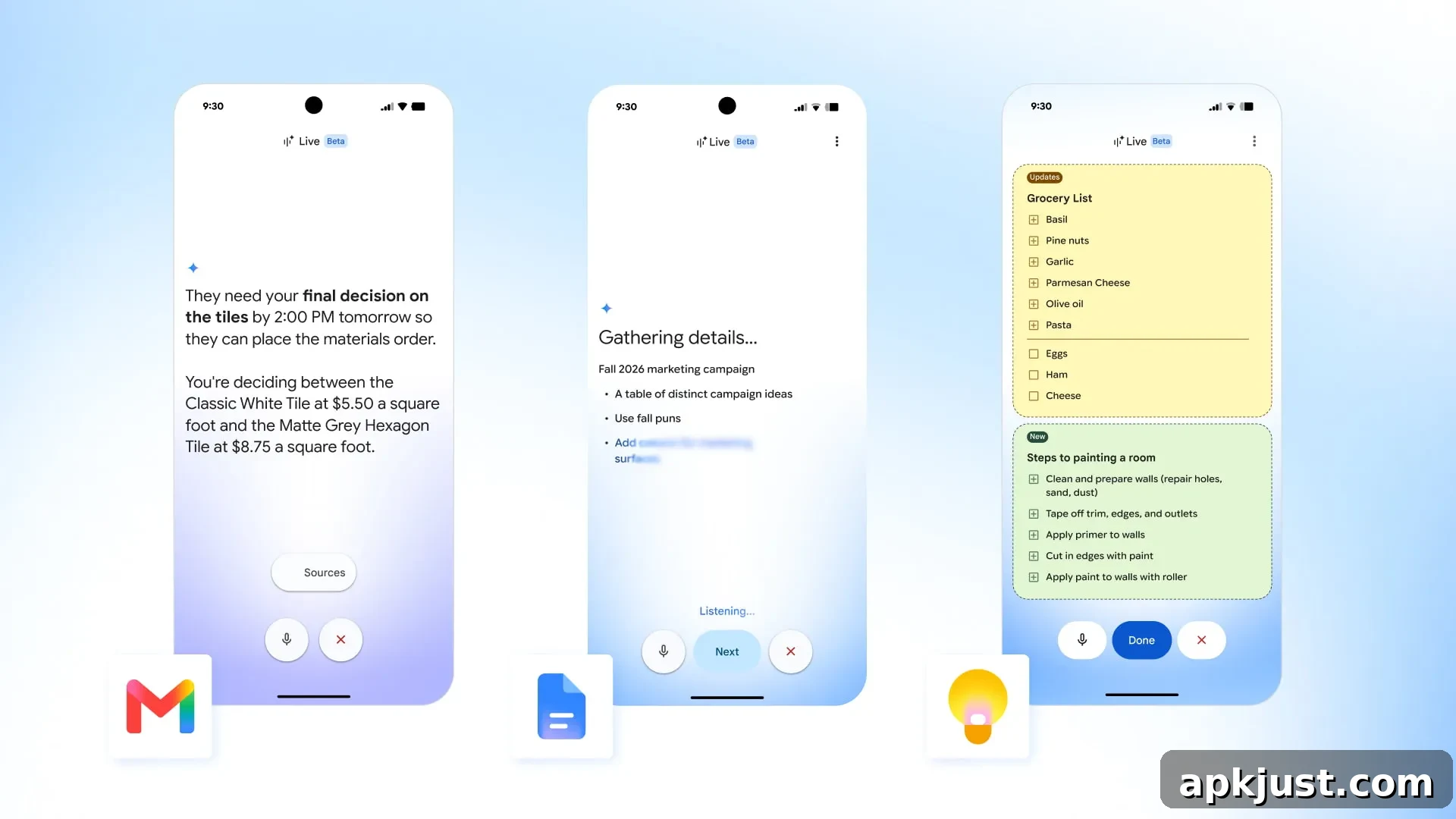
Following the announcement at I/O 2026, Google has begun rolling out Gmail Live, Docs Live, and Keep Live this week. After several months of testing, these new voice-driven capabilities are now generally available and aim to make email, document creation, and note-taking faster and more conversational for everyday users.
Gmail Live gives you a conversational way to interact with your inbox. Instead of manually searching for messages or scrolling through long threads, Gmail Live lets you speak naturally to find specific information, summarize conversations, and surface relevant emails. Powered by Gemini, the feature supports back-and-forth exchanges so you can ask follow-up questions without repeating context.
The interface opens full screen and displays a running transcript of the conversation alongside links to the source emails, making it easy to verify results and jump directly to the original messages. You can interrupt the assistant at any time to change topics, and the system preserves context across questions so sessions feel fluid rather than fragmented. To start a voice session, tap the new Live icon in the Gmail search bar.
Gmail Live is available to users with Google AI Plus, Pro, and Ultra plans on Android and iOS in English worldwide. It is designed to speed up common email tasks like locating attachments, summarizing long threads, finding action items, and extracting dates or contact details from messages.
Docs Live is positioned as a hands-free collaborator and co-writer to help you draft content quickly. Whether you need a summary, proposal, outline, or a first draft of a document, Docs Live can take voice instructions and produce a usable starting point. It can incorporate context from your Gmail, Drive, Chat, and publicly available web information to produce more relevant drafts.
Before generating content, Docs Live provides a short recap of the information it will use, letting you confirm or refine the inputs. You can then request edits, add specific details, or ask for different formatting and tone. In the Google Docs mobile app, a new “Create with voice” option appears when you tap the floating action button (FAB), making it simple to launch the feature and dictate your ideas without touching the keyboard.
Docs Live is available for users on AI Pro and Ultra plans on Android and iOS. The functionality is intended to reduce drafting time, help brainstorm structure and phrasing, and support on-the-go content creation when typing is inconvenient.
Keep Live is designed to capture spoken thoughts, lists, and ideas and turn them into organized notes. By listening to quick voice “brain dumps,” Keep Live can generate notes, create checklists, and extract actionable items within seconds. The assistant is built to follow the natural flow of your speech, converting a stream of consciousness into clear, editable entries that appear as inline previews in Google Keep.
You can instruct Keep Live to add items to a shopping list, assemble ingredients, or create multiple notes during the same session. The system recognizes intent—so asking it to “put ingredients for pesto pasta in my shopping list” results in an appropriately organized list entry. You can also use voice commands to edit the generated notes, such as checking items off or appending details.
Keep Live can add new content to existing notes as well. For example, if you already have a grocery list and tell Keep you need bananas, it will add bananas to your current list rather than creating a duplicate. This makes it easier to maintain and update ongoing lists or project notes without switching context.
For example, if you already have a grocery list and you tell it you need to remember to get bananas, Keep will just add bananas to your existing list.
Keep Live is available on Android and requires Google AI Plus (updated), Pro, or Ultra. Google has indicated that these Live features will be coming soon to Google Workspace business customers, expanding availability to teams and organizations in the near future.
Across Gmail Live, Docs Live, and Keep Live, the goal is consistent: make common productivity tasks faster and more natural by using voice and conversational AI. These features aim to reduce the friction of searching, typing, and switching apps, helping users capture ideas, manage tasks, and create documents with fewer steps. As they roll out more widely, users should see improvements in everyday workflows like email triage, quick drafting, and note management.