
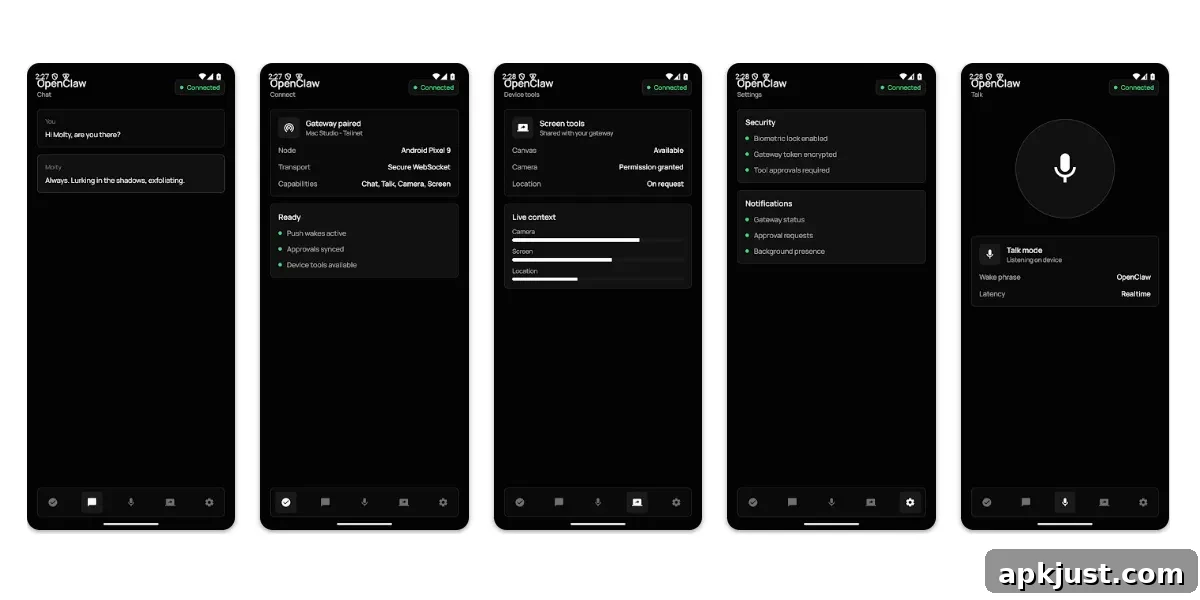
AI agents are being touted as the next major leap in artificial intelligence, and OpenClaw has quietly been developing its own take on the concept for some time. Today the team released a companion gateway app for Android (with iOS availability noted), designed to bring agent functionality to mobile devices. The app aims to connect to a user’s private OpenClaw Gateway so they can interact with their agent while on the move.
Announced on Twitter/X, OpenClaw’s mobile app pairs with an existing OpenClaw Gateway instance so your phone functions as a secure node in your agent setup. The app supports text chat with the assistant, real‑time voice interactions, action approvals on the go, and optional device-aware features such as camera, screen, and location access when you choose to enable them.
OpenClaw’s Play Store description summarizes the core capabilities:
Pair this Android app with your OpenClaw Gateway to use your phone as a secure node for chat, voice, approvals, and device-aware automation.
What you can do:
- Pair with your private OpenClaw Gateway by QR code or setup code
- Chat with your assistant from Android
- Use realtime Talk mode and push-to-talk
- Review Gateway action approvals from your phone
- Enable device capabilities such as camera, screen, location, and notifications when you choose
- Receive push wakes and node status updates for connected workflows
For anyone already using OpenClaw, a mobile gateway node could be a practical addition: it lets you monitor workflows, confirm or deny actions, and converse with an assistant while away from your desktop setup. The promise is a secure, private way to extend agent control to phones without relying on third‑party cloud services.
That said, the app’s presentation leaves room for improvement. Preview screenshots in the store show a very minimal interface that, in some cases, intrudes into the phone’s status bar area, with the OpenClaw header appearing behind the clock and notification icons. On an actual device such as a Galaxy Z Fold 7, the app appears a bit cleaner, though experiences will vary depending on device and whether you can pair it to a gateway.
Historically, OpenClaw has prioritized function over polished visuals—its desktop tools often lean heavily on command‑line workflows—so a utilitarian mobile app is not unexpected. Still, the iOS version reportedly looks somewhat more refined, and several early Android reviews indicate the app may be rough around the edges in functionality as well. At the time of release, the app has a low average rating, with users describing pairing problems, instability, and general usability issues.
Those initial complaints underscore a common pattern: feature-rich, experimental tools often arrive before the interface and reliability are fully smoothed out. For users comfortable troubleshooting and who already run an OpenClaw Gateway, the mobile node could be a powerful tool even in this early form. For newcomers hoping for a polished out‑of‑the‑box mobile experience, the app may feel incomplete.
OpenClaw’s mobile gateway concept is notable because it preserves the idea of a private, user-controlled agent network. Instead of routing everything through a vendor’s cloud, this model lets people keep their gateway private while still taking advantage of mobile conveniences like push notifications, voice interactions, and device‑aware automations. That design philosophy will appeal to privacy‑minded users and those who prefer hands‑on control of their AI workflows.
Ultimately, the app’s usefulness will depend on how quickly OpenClaw iterates on stability, pairing reliability, and user interface polish. If the team improves those areas while retaining the gateway‑first security model, the mobile app could become a valuable component of an agent ecosystem that emphasizes control and decentralization.
More on AI:
- Gemini Spark rolls out to Google AI Ultra in the US: How it works
- ChatGPT reportedly prepares major redesign focused on agents as ‘chat is dead’
- Gemini’s new Google Play Store integration lets you chat to find Android apps, games
Follow Ben: Twitter/X, Threads, Bluesky, and Instagram