
Like the Gemini app before, Google is now deeply integrating “AI Mode” across desktop and mobile Chrome, bringing more powerful, context-aware assistance directly into the New Tab Page and search experience.
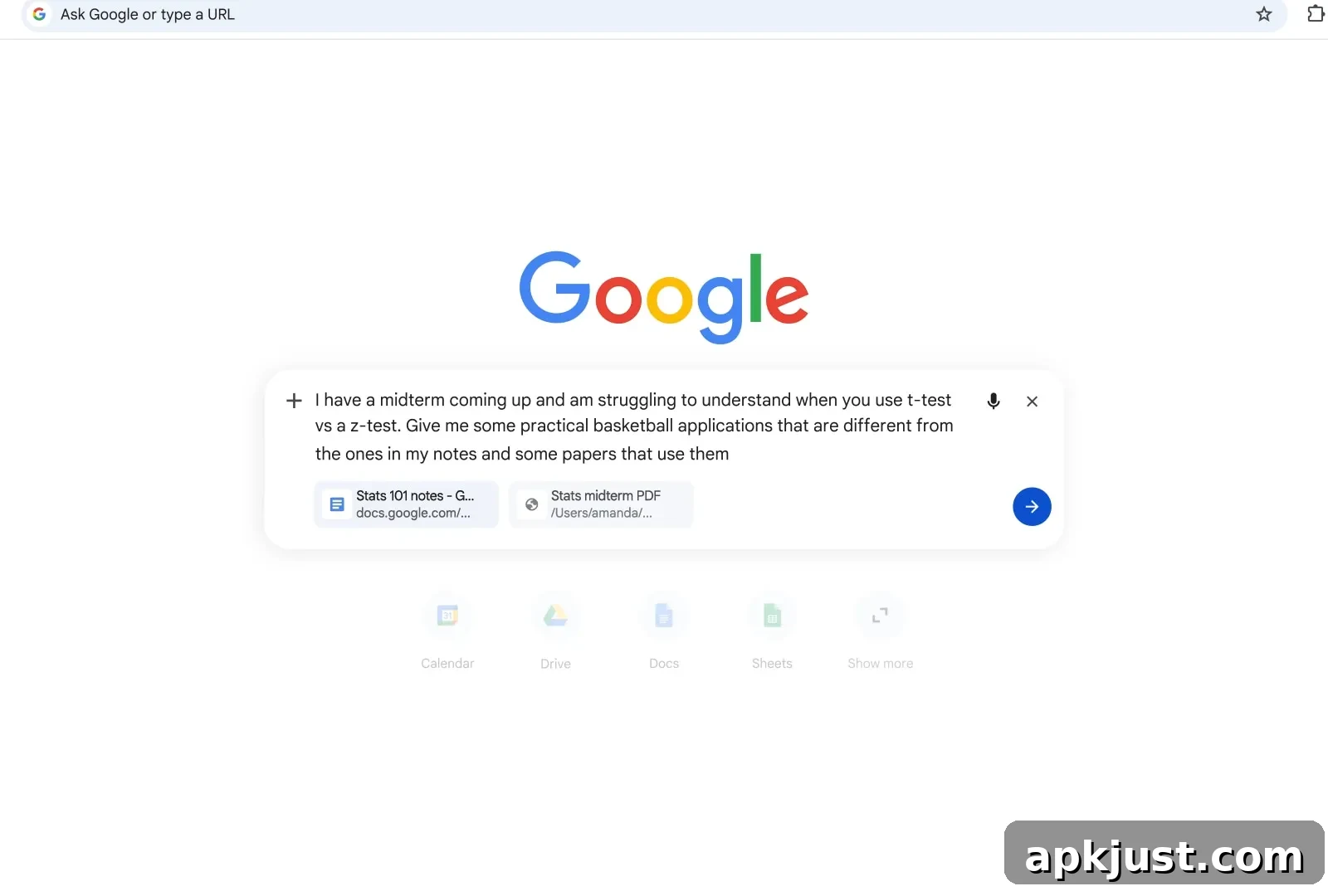
On desktop, the New Tab Page (NTP) now offers a richer AI Mode workflow. Tapping the “AI Mode” button opens an inline prompt box rather than simply directing you to a separate webpage. This inline prompt is designed for quick, focused interactions without forcing users to leave the current tab or reopen a separate site. The prompt includes a small plus icon that expands options: you can add recent tabs for context, upload images and files, create images, perform a Deep Search, open Canvas, and switch between Gemini 3 models. These inputs can be combined, letting you mix text prompts with uploaded files or images to refine results and get more precise answers.
When following links from within AI Mode, the active conversation compresses into a side panel. This allows you to browse the linked page or watch a YouTube video while keeping the AI interaction accessible. You can continue asking follow-up questions tied to the content you’re viewing, enabling a more continuous, contextual research or browsing session. The side panel keeps the conversation visible alongside web content so you can reference earlier responses, refine queries, and gather insights without repeatedly switching tabs.
Google says early testers appreciated the reduced need for tab switching. Having both Search and the web open side-by-side helped users stay focused on tasks while exploring useful pages. This workflow aims to streamline research, planning, and content discovery by keeping AI assistance immediately available alongside normal browsing.
On mobile — both Android and iOS — AI Mode enhancements mirror the desktop improvements in a mobile-friendly format. Tapping the search bar on the New Tab Page opens a fullscreen search and address UI as before, but the search pill expands into a prompt box the more you type. The mobile plus menu gives quick access to Camera, Gallery, and Files for uploading images or documents. Selecting “Tabs” brings up a grid-style view so you can choose open pages to add as context to your query.
These mobile features are built to make it easier to combine different inputs — text, images, open tabs, and files — from the same device without interrupting your workflow. For example, you can snap or upload a photo from the Camera or Gallery, add an open tab for context, and then ask Gemini for an explanation, summary, or next steps, all within the same prompt interface. The design emphasizes a seamless experience across form factors so users can transition from desktop to mobile and keep a similar interaction pattern.
AI Mode also supports image creation and a Deep Search capability directly from the prompt, opening up creative and research-focused possibilities. Canvas integration provides an environment for visual or iterative tasks, while Gemini 3 model switching allows users to select the model best suited to their needs. The flexibility to combine uploads and typed prompts helps users tailor queries and obtain richer, more actionable responses.
This expanded AI Mode integration is available in Chrome for desktop, Android, and iOS. Google has begun rolling the feature out in the United States today, with plans to expand availability to additional countries in the future. Early feedback from testers highlights better task focus and a smoother browsing-to-assistance transition thanks to the side-by-side Search and web experience.
As Chrome continues to evolve, these AI Mode updates aim to reduce friction between searching, browsing, and acting on information. By keeping AI tools integrated into the New Tab Page and enabling mixed-input prompts, Google is focusing on making in-browser assistance faster, more contextual, and easier to use across devices.