
YouTube has lately become a source of frustration for many viewers, especially those trying to skip or avoid ads. Recently the service introduced a new, widespread annoyance: repeated CAPTCHA challenges that interrupt access to videos and make using the site difficult for some users.
Multiple reports on community forums and outage trackers describe viewers encountering frequent CAPTCHA prompts when attempting to load YouTube pages. These prompts are basic, word-based CAPTCHAs rather than modern image-selection tests, yet they are showing up repeatedly during normal browsing. Users seeing the interruptions report a generic warning that labels the traffic as “unusual,” and that message appears to be the trigger for the CAPTCHA gate rather than any clear or consistent behavior by the viewer.
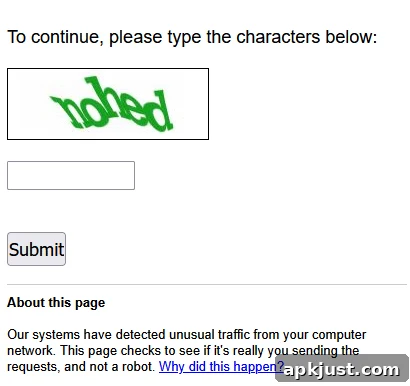
There does not appear to be a single cause shared by everyone affected. Some individuals reporting the issue explicitly say they are not using a VPN, which is a common trigger for “unusual traffic” warnings on other Google services. Others tried switching DNS providers, such as moving to Google Public DNS, and saw the problem disappear briefly only for the CAPTCHA prompts to return later. Ad blockers, another frequent suspect, also do not seem to be the universal culprit: at least one user reported disabling their ad-blocking extension and still encountering continuous CAPTCHA challenges.
At the time of these reports, the issue seems concentrated on the desktop web version of YouTube. Numerous comments indicate that mobile apps—both Android and iOS versions—have been operating normally for users who ran into the web-based CAPTCHA loop. The problem is not universal; many other viewers report no interruptions at all when using the site in a regular browser session or in a private browsing window. That uneven distribution suggests the glitch is an intermittent server- or configuration-side problem rather than an issue tied strictly to individual accounts or devices.
If you are currently being affected by repeated CAPTCHAs on the YouTube website, there are a few practical steps you can try while waiting for an official resolution. First, switch to the YouTube mobile app if you have a smartphone handy: several users have found the app continues to work normally. Second, try an incognito or private browsing session to rule out browser extensions or saved cookies as potential triggers. Third, test a different network, such as a mobile hotspot, if possible; some affected users have intermittently regained access when changing their connection. None of these measures are guaranteed to help every user, but they can be useful troubleshooting steps while the underlying issue is addressed.
Because the behavior appears to originate from YouTube’s infrastructure or configuration checks, the ultimate fix depends on changes from the service itself. Site operators may need to adjust the thresholds that flag traffic as suspicious or to correct an error in the CAPTCHA enforcement logic. Until those adjustments are applied, the experience for some desktop users may remain inconsistent.
Update, 3/26: YouTube acknowledged the problem in an official community message and confirmed that the repeated CAPTCHA redirects were the result of an error. The service reported that it has fixed the bug, and affected users should see normal access restored. If you continue to encounter CAPTCHA prompts after that update, try the troubleshooting steps outlined above or wait briefly for the change to propagate across all servers.